

🤖 专为创作者设计的AI驱动齿音消除器
简单去齿音,消除人声或语音录音中的尖锐边缘——无需过度思考,即刻获得更平滑、更专业的声音。
🎯 AI驱动的检测与处理
自动参数化,带来自然声音
易于使用的选项,可自定义结果
采用领先技术进行齿音消除
借助我们的神经网络,pure:deess 仅需几秒钟即可分析您人声中的齿音。在此期间,它会建立一个”声纹”——该特定人声齿音特征的配置文件,可作为人声在适当平衡时应有声音的目标。而且,pure:deess 不仅仅检测”Ess”音来建立配置文件;它会为 Z、Sh、Ch 和 T 等音素单独计算目标配置文件,从而带来随源内容变化、更自然的声音。
🎚️ 一个旋钮控制的齿音消除
一个旋钮即可抚平所有毛刺
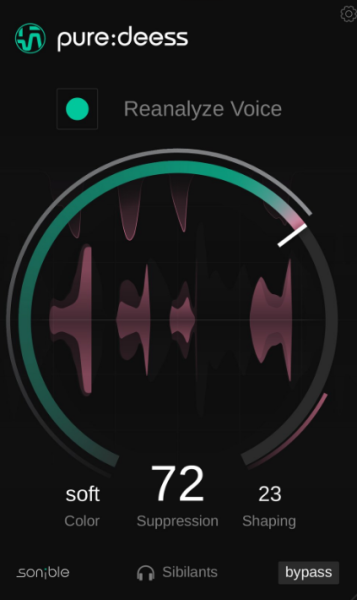
直观界面蕴含复杂处理——这正是 pure 系列的精髓,pure:deess 也不例外。只需使用主”抑制”旋钮来增加或减少抑制量,以适应您的具体环境,并通过耳朵来精细调整人声内部的平衡。单独的人声旁白和稀疏、亲密的音乐编排,可能比繁忙的全频段混音需要更少的抑制量——无论如何,选择权在您。
🎨 色彩与塑形控制,实现更细致的变化
定制并细化齿音特性
将”色彩”参数设置为柔和、平衡或锐利,以定义人声中齿音的音色。pure:deess 不仅仅是影响增益衰减量,而是利用”声纹”分析,为每个齿音得出一个新的目标频谱。”塑形”参数与所选的”色彩”相关联。增加此参数时,该功能会对齿音进行更多频谱处理,而不是宽频、均匀的塑形。
The AI-powered de-esser designed for creators
Simple de-essing for removing the sharp edges from a vocal or speech recording – get a smoother and more professional sound instantly without the risk of overthinking it.
AI-powered detection and processing
Automatic parametrization for a natural sound
Easy-to-use options to customize results
AI-powered detection of your source’s characteristics
De-essing with leading technology
Thanks to our neural networks, it just takes a few seconds for pure:deess to analyze your vocal’s sibilance. During that time, it builds a ‘voiceprint’ – a profile of the sibilance characteristics for that particular voice, ready to use as a target for how the voice should sound when balanced properly. And pure:deess doesn’t just detect “Ess” sounds to build the profile; it computes the target profiles for Z, Sh, Ch and T phonemes individually, leading to a more natural sound that varies with the source content.
Suppression control for one-dial de-essing
One dial to smooth out all the rough edges
Intuitive interface meets complex processing under the hood – that’s what the pure series is all about and pure:deess is no exception. Simply use the main Suppression dial to increase or decrease the amount of suppression to fit your specific context, and refine the balance within the voice by ear. Solo voice-overs and sparse, intimate musical arrangements may require less reduction than busy, full-range mixes – in any case, the choice is yours.
Color and Shaping controls for more detailed changes
Customize and refine sibilant character
Set the Color parameter to Soft, Balanced or Sharp to define the sound of sibilants in the voice. Rather than just affecting the gain reduction amount, pure:deess uses the ‘voiceprint’ analysis to arrive at a new target spectrum for each sibilant sound. The Shaping parameter is linked to the chosen Color. When increased, this feature performs more spectral processing to the sibilant sound rather than broadband, uniform shaping.
AI-powered detection of your source’s characteristics
De-essing with leading technology
Thanks to our neural networks, it just takes a few seconds for pure:deess to analyze your vocal’s sibilance. During that time, it builds a ‘voiceprint’ – a profile of the sibilance characteristics for that particular voice, ready to use as a target for how the voice should sound when balanced properly. And pure:deess doesn’t just detect “Ess” sounds to build the profile; it computes the target profiles for Z, Sh, Ch and T phonemes individually, leading to a more natural sound that varies with the source content.
Suppression control for one-dial de-essing
One dial to smooth out all the rough edges
Intuitive interface meets complex processing under the hood – that’s what the pure series is all about and pure:deess is no exception. Simply use the main Suppression dial to increase or decrease the amount of suppression to fit your specific context, and refine the balance within the voice by ear. Solo voice-overs and sparse, intimate musical arrangements may require less reduction than busy, full-range mixes – in any case, the choice is yours.
Color and Shaping controls for more detailed changes
Customize and refine sibilant character
Set the Color parameter to Soft, Balanced or Sharp to define the sound of sibilants in the voice. Rather than just affecting the gain reduction amount, pure:deess uses the ‘voiceprint’ analysis to arrive at a new target spectrum for each sibilant sound. The Shaping parameter is linked to the chosen Color. When increased, this feature performs more spectral processing to the sibilant sound rather than broadband, uniform shaping.