

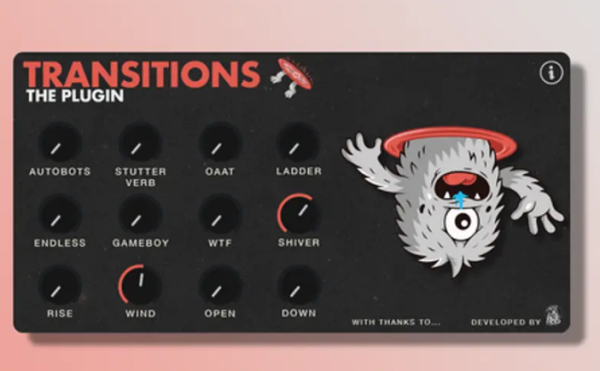
🌀 Transitions 插件:用最简单、最具创意的方式,为你的歌曲制作无限独特的过渡效果!🚀
🎛️ 两种模式:
- 🟢 简易模式(Simple Mode):只需将一个效果旋钮从 0 到 100% 进行自动化,即可瞬间生成过渡效果。
- 🎨 创意模式(Creative Mode):可组合多个效果,尝试不同的自动化曲线,探索每种效果状态的多种变化。
💡 核心优势:
- 🧩 全平台插件版:基于备受好评的 Transitions Ableton Rack 概念开发,现已成为适用于所有 DAW 的独立插件。
- ⚡ 超低 CPU 占用:相比原版 Rack,进行了深度优化,大幅降低 CPU 负载。
💿 支持格式:
- Mac:AU, VST3, AAX
- Windows:VST3, AAX
🎹 Ableton Live 用户专属:
- 🎁 包含 Max for Live 外壳设备(Wrapper)。
- 📥 使用方法:先安装主插件,然后将
.amxd设备拖入工程即可调用。
🖥️ 系统要求:
- Mac:支持 AU, VST3, AAX 格式的宿主。
- Windows:支持 VST3, AAX 格式的宿主。
The easiest & most creative way to craft unlimited, unique transition effects in your songs.
Simple Mode: Automate a single effect knob from 0–100% for instant transitions.
Creative Mode: Combine multiple effects, experiment with automation patterns, and explore different variations of each effect state.
It’s the same concept as my Transitions Ableton Racks—but now in a plugin for all DAWs, optimized for much lower CPU usage than the racks.
Available formats
Mac: AU, VST3 & AAX I Windows: VST3 & AAX
Ableton users: Max for Live wrapper included (install the plugin first, then drag & drop the Max4Live device into your session to load)
System Requirements
Mac: AU, VST3 & AAX
Windows: VST3 & AAX