

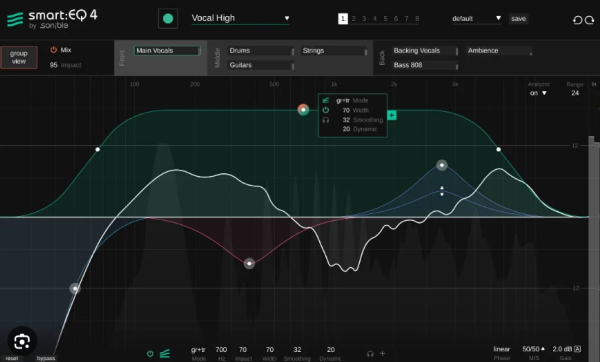
🎛️ smart:EQ 4 —— 用 AI 修正频谱问题,实现音色平衡
这款均衡器让你能从“混音”的视角处理项目:智能跨通道处理提供多轨道的层级控制,让你通过拖放即可完成频谱混音。
🤝 智能跨通道处理,解决频谱掩蔽
🔧 AI 滤波器自动修正音色失衡
动态均衡、混音配置文件、参考音轨功能、自动增益……
🎧 轻松兼顾混音全局
与通常忽略混音上下文的普通均衡器不同,smart:EQ 4 让你轻松掌控多轨道的去掩蔽过程。通过简单的拖放操作(最多 10 轨),即可完成频谱混音。
- 设定优先级:为每个智能滤波器(smart:filter)设定优先级,将某些元素推到声场前景,某些留在中间,某些置于背景。
- 远程统一控制:无需在不同插件实例间来回切换——同一组内的任何实例都可以被其他实例远程控制。
🤖 AI 均衡,即刻获得频谱平衡
smart:filter 是 smart:EQ 4 的核心。它根据你为轨道选择的目标配置文件(Profile),自动平衡信号。
- 精细调节:打开智能滤波器组件,调整 Smoothing(平滑度)参数以获得更温和的滤波,或开启 Adaptive(自适应)选项以平滑高动态信号。
- 频率聚焦:你可以分割智能滤波器的绿色加权曲线,设定特定频率范围,让智能算法只在该区域工作。
三种工作模式:
- Track(轨道):平衡本通道。
- Group(组):不影响本通道,但减少它与组内其他成员的掩蔽。
- Track and Group(轨道与组):既平衡本通道,又进行去掩蔽处理。
🎸 丰富的乐器、人声与混音配置文件
smart:EQ 4 提供了丰富的乐器与人声配置文件,可用于单轨或总线。
- 风格化处理:使用基于流派的配置文件为混音做最后的频谱润色。
- 参考音轨:加载参考曲目创建自定义配置文件,让 smart:EQ 4 在你的通道上模拟其频谱特性与平衡。
- 学习时间控制:你现在甚至可以指定 smart:EQ 4 分析输入信号的最大学习时长。
smart:EQ 4 uses AI to correct spectral issues and achieve tonal balance. This equalizer empowers you to approach a project from a mix’ perspective: Intelligent cross-channel processing offers hierarchical control over multiple tracks and enables you to get spectral mixing done via drag and drop.
Intelligent cross-channel processing for spectral unmasking
AI-filter to automatically correct tonal imbalances
Dynamic EQing, mix profiles, reference track feature, auto gain,..
Keeping the mix context in mind – effortlessly
Unlike usual equalizers that leave the context of a mix out of any processing, smart:EQ 4 lets you take control over multi-track unmasking processes easily and get spectral mixing done by simple dragging and dropping up to 10 tracks. This set priorities for each smart:filter, bringing some elements to the forefront of the sonic stage, leaving some in the middle, and pushing some into the background. Switching back and forth between instances is a thing of the past in this innovative tool – any instance within the same group can be remotely controlled from any other instance.
AI-powered equalization for instant spectral balance
The centerpiece of smart:EQ 4 is the smart:filter – it automatically balances the signal based on a target Profile you choose for your tracks. The smart:filter within each EQ instance comes with a range of features to adjust the AI-powered processing to your liking. Open up the smart:filter widget to tweak the Smoothing parameter for gentler filtering and turn up the Adaptive option to smooth out highly dynamic signals. You can split the green weighting curve of the smart:filter and set a certain frequency range to define where the intelligent algorithms should get to work.
smart:EQ 4’s smart:filter can be used in three modes: ‘Track’ balances the channel; ‘Group’ doesn’t affect the channel but reduces masking between it and other group members; ‘Track and Group’ applies balancing to the channel and makes it subject to unmasking.
Profiles for instruments, vocals and entire mixes
With each generation of smart:EQ, the range of available Profiles grew. smart:EQ 4 sports instrument and vocal Profiles that you can use on single tracks or busses. To give your mix a final spectral polish, use one of the genre-based profiles. If you are chasing a certain sound, load up a reference track to create a custom profile and have smart:EQ 4 emulate its spectral character and balance on your channel or buss. By popular demand, now you can even specify the maximum learning time that smart:EQ 4 should use to analyze the input signal.