

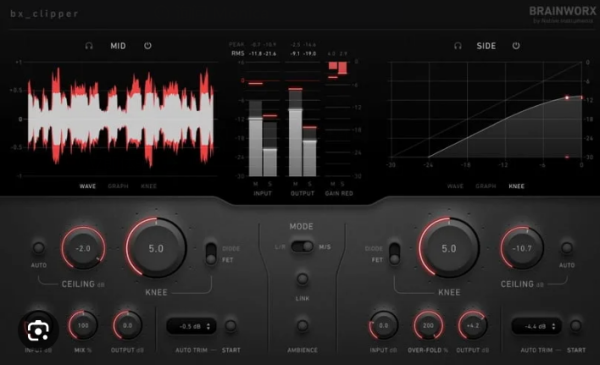
✂️ Brainworx bx_clipper — 终极削波/Clipping
易用性与不妥协的音质兼得,打造极具竞争力且通透清澈的母带响度。
Brainworx bx_clipper 会对超过设定阈值(Ceiling/天花板上限)的波形峰值进行截断(Truncate)。它能让你在不抬升峰值电平的前提下让混音播放更响。与传统限幅器不同,bx_clipper 在提升响度的同时可避免产生压扁的 Pumping(呼吸)效应。
你手中限幅器的全新最佳拍档——将 bx_clipper 挂在母带链路末端(限幅器前或后),即可获得现代感十足、清透且密度与响度媲美商业竞品的混音。它承接限幅器未尽之处,填补”够响”到”超响”之间的空白。
✨ 主要功能 / Features:
- ✂️🎛️ Choose from smooth to edgy clipping effects — 两种削波模式可选:FET 模式音色平滑自然;Diode 模式带来棱角分明的失真。配合 Ceiling 与 Knee 控制可在软削波至硬削波间连续调节(Two modes: FET smooth / Diode edgy + Ceiling & Knee)
- 📈🔇 Maximize loudness while avoiding distortion — Auto Ceiling 自动分析音频峰值并设定上限,在最大化感知响度同时避免不必要失真(Auto Ceiling feature)
- 👂⚖️ Avoid loudness bias with equal-loudness comparisons — Auto Trim 分析输入与处理后 RMS 差值并自动补偿输出增益,便于做等响度 AB 对比,也可抑制总线上的叠加峰值而不破坏平衡(Auto Trim for equal-loudness A/B comparison)
- 🎚️🔀 Clip the mids and sides of your mixes independently — 支持 Dual-mono 与 M/S 操作中继,左右独立或 Mid/Side 分别处理;例如 Side 用激进 Diode 模式、Mid 用柔和 FET 模式来获得响亮且清晰的立体声母带(M/S operation & dual-mono mode)
- 🎛️🔥 Analog warmth and digital-only features — 模拟电路建模+纯数字功能:Ambience 可监听被削波削掉的信息用于创意效果;Wet 旋钮可超出 100% 产生过折叠失真(Over-fold Distortion),为 Kick/Snare 注入 80s–90s 鼓合成器风味(Ambience + Wet knob >100% over-fold distortion)
📦 格式 / From nfo:
- (64-bit: VST3, VST2, AAX)
🛠️ 安装说明 / Install Notes:
1a). 运行安装程序 .exe,并用破解补丁文件替换原文件。
1b). 若已安装旧版,直接将破解文件拖入覆盖原文件即可。
🆕 更新说明 / Whats New:
- v1.0.1 疑似 Plugin Alliance 于 2024-05-02 “发布”,但 PA 照例忘记更新变更日志……请自行确认 😏
The ultimate clipping solution – ease of use meets uncompromised sound quality
Competitively loud and crystal clear masters
The Brainworx bx_clipper truncates the peaks of waveforms above a set threshold level (Ceiling). It allows you to create mixes that playback louder without increasing their peak level. Unlike a limiter, bx_clipper increases loudness while avoiding squashed pumping effects.
Your limiter’s new best friend
Applying bx_clipper to the end of your mastering chain — before or after your limiter — will help you create modern and crystal-clear mixes that feel as dense and loud as the competition. bx_clipper picks up where your limiter leaves off and bridges the gap between loud and ultra-loud.
Choose from smooth to edgy clipping effects
The clipping engine found within bx_clipper offers two modes of operation. FET mode provides a smooth and natural sound, while Diode mode delivers edgy distortion. Combined with bx_clipper’s Ceiling and Knee controls, FET mode and Diode mode allow you to choose from a spectrum of soft clipping to hard clipping effects.
Maximize loudness while avoiding distortion
bx_clipper’s Auto Ceiling feature analyzes the peaks in your audio signal and automatically sets the plugin’s Ceiling level. The level at which the Ceiling is set will maximize perceived loudness while avoiding unwanted distortion. As a result, bx_clipper allows you to create extremely loud masters without destroying your mix.
Avoid loudness bias with equal-loudness comparisons
The Auto Trim feature provided by bx_clipper analyzes the RMS difference between the input and processed signals. Auto Trim automatically adjusts bx_clipper’s output level and lets you conduct equal-loudness comparisons. It helps you tame summing-related peaks that occur in instrument groups without unbalancing your mix.
Clip the mids and sides of your mixes independently
Similar to other Brainworx products, bx_clipper features dual-mono and M/S operation modes for enhanced stereo control. You can apply varying clipping effects to the left and right channels when working with an unsymmetrical mix. Create loud masters with clarity by using the aggressive Diode mode on the sides and the softer FET mode on the center of your stereo image.
Analog warmth and digital-only features
By combining analog-modeled circuits with a digital design, bx_clipper delivers the best of both worlds. Digital-only features like Ambience allow you to audition the information lost from clipping and craft unique creative effects. Another digital-only highlight is the Wet knob, which extends beyond 100% to deliver over-fold distortion, allowing you to infuse kicks and snares with the characteristic flavor of drum synthesizers from the 80s and 90s.
From nfo
(64-bit: VST3, VST2, AAX)
1a). Install .exe, & replace with patched files.
1b). If you have a previous version installed, just Drag’n’drop the patched files over old ones
Whats new in this version
v.1.0.1 seems was “released” by P.A: 2024-05-02.
Again, P.A forgot to update changelog, sloppy as usual…check it yourself =)
System Requirements
macOS 14 down to macOS 11
Homepage