

🎙️ VocalNet:实时 AI 语音克隆与变换插件
用 VocalNet 的 AI 语音引擎实时变换任何人声——瞬间改变音色 (Timbre)、音高 (Pitch) 和演唱风格。
🔄 三步完成声音克隆与变换
- 📥 导入语音样本
VocalNet 分析导入的样本并克隆为目标声音。样本越干净、越少处理,变换质量越高。
- ▶️ 实时变换输入人声
播放你的音频轨道——VocalNet 会作为音频效果插件,实时将输入声音转换为目标声音。
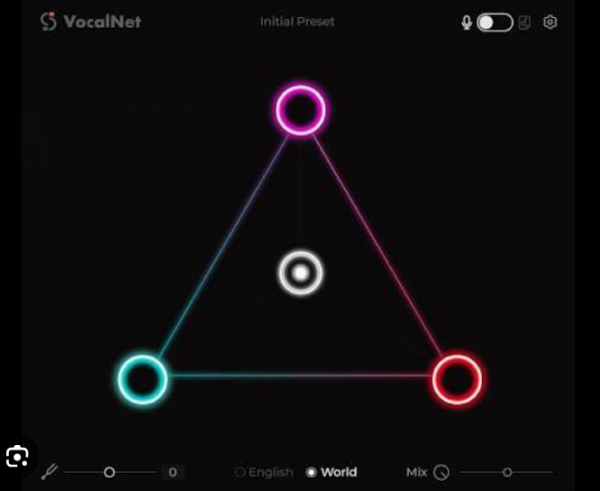
- 🎚️ 多声音间实时融合 (Morph)
可加载最多 3 个目标声音,拖动光标即可实时混合出独有的人声色调。
🎛️ DAW 集成
- 支持 ARA (Audio Random Access) 工作流,兼容宿主可直接在时间轴上操作
- 更紧密的集成、更快的响应、更流畅的编辑体验
💻 系统要求
- Windows 10 / 11
Real-Time Voice Cloning & Transformation Plugin. Transform any vocal in real-time with VocalNet’s AI voice engine. Change timbre, pitch, and style instantly.
Clone & Transform Voices in Three Steps
1. Import Voice Samples
VocalNet analyzes the imported samples and clones them as target voices. The cleaner and less processed the samples, the higher the quality of the transformations.
2. Transform Input Voice
Start playback on your audio track — VocalNet will convert the input in real time to match the target voices as an audio effect.
3. Morph Between Voices
Load up to three voices, then drag the cursor to blend them into a unique tone in real time.
Full DAW Integration with ARA Support
VocalNet supports ARA workflows for compatible DAWs, so you can work directly on your track timeline with faster, tighter integration and a smoother editing experience.
System Requirements: Windows 10, 11