

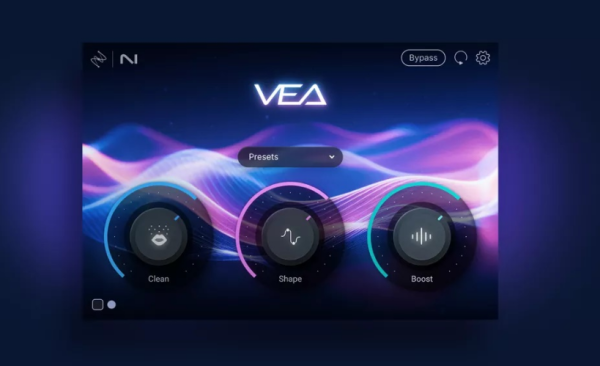
🎙️ VEA (Voice Enhancement Assistant):AI 人声增强助手
VEA 是一款由 iZotope 出品的 AI 音频增强工具,专为播客主和内容创作者设计,让任何层级的使用者都能轻松获得专业级人声——无需懂混音,也能让声音听起来自信、清晰、有质感。
✨ 核心功能
🔹 Shape(塑形)
根据人声特性自动优化,瞬间让声音更圆润专业。无需手动调 EQ 或翻预设——旁白配音、播客访谈,几秒内让你的声音达到播出标准。
🔹 Boost(增强)
一键提升存在感与力度,去除”压缩/限制怎么设”的困惑。让 Vlog、教程的人声更均匀、更有吸引力。
🔹 Clean(降噪)
内置源自 RX 技术的噪声抑制,智能削减空调声、电流干扰等背景噪音,保留人声自然度。
🛠️ 技术背景
内置源自 RX、Ozone 和 Nectar 的行业领先音频增强技术——提升清晰度、统一电平、降低背景噪声。
Voice Enhancement Assistant
VEA (Voice Enhancement Assistant) is an AI audio enhancer designed to deliver professional-sounding audio for podcasters and content creators of all levels without hassle.
Enjoy the sound of your own voice
VEA is an AI audio enhancer that takes any voice recording and makes it more powerful, more polished, and more professional. This easy-to-use tool is perfect for podcasters and content creators of all skillsets, whether you’re a beginner or a seasoned pro.
VEA Features
Built with industry-leading audio enhancement technology from RX, Ozone, and Nectar, VEA increases clarity, sets more consistent levels, and reduces background noise.
Shape
VEA’s Shape control is tailored to your voice, instantly making you sound more polished and professional. No more playing with equalizers or surfing presets to improve your voice mixing. Whether you’re narrating a video or hosting an interview on your own podcast, VEA ensures your voice sounds audience-ready in seconds.
Boost
Easily add presence and power to your voice with Boost. VEA takes the guesswork out of voice mixing. Don’t worry about understanding compression and limiting, just focus on sounding your best. For content producers, this means getting an even sound for your vlogs and tutorials to create a smoother and more engaging experience for your audience.
Clean
VEA features essential noise reduction software that trims noise while leaving your voice sounding great. The Clean control helps de-noise your audio, taking background noise out of the spotlight so your voice can shine. Recording a vlog under the AC? Taking a virtual interview with signal interference? It’s no problem with VEA.
System Requirements
Windows 10, Windows 11